The Nix Experience: Managing macOS with Nix
Introducing Nix and my experience of using Nix as ultimate package manager and system configuration tool.
Cover featuring artwork by @_liellac, Kudos to the artist for my hero image 🙏
Few months ago, I decided to try nix as my package manager to replace Homebrew as I feel like using Homebrew overtime brings back the feeling of messy dependency hell (like miniconda on Python) on my macOS, also, I was shilled by my X oomfie to try nix for superb configuration experience that may fit with my idea of what ideal development environment looks like(?). Anyway, I got carried away, went deep on nix rabbit hole, and started tweaking my macOS system configuration, including shell, secret management, window manager configuration, etc declared using nix on single dotfiles repo.
Also as performative larpmaxxing techbros I promised to myself in my previous blog that I will be writing about nix someday. Finally, this is the first blog I’ll be writing about nix, starting from my macbook setup first!
What is Nix
Nix is purely functional package manager and build system configuration tool that is built around the ideas of being declarative, reproducibility, and version-controlled. You can think of it as combination of:
- Git for rollback and version control
- Docker for “yo its work on my machine!” reproducibility
- Terraform for declarative infrastructure as code (IaaC approach)
- Make for deterministic builds
But it’s designed for package management (also system too) such as AUR (arch linux), homebrew, apt, npm, etc. Maybe the analogy I use here is a bit misleading as even though it uses concept of “reproducibility” like in docker, nix builds from source, not containers. Think of it like git where every change creates a new “commit” you can roll back instantly like time machine and nothing gets overwritten and randomly breaks. Also I stated that its like terraform due to its Infrastructure as a Code nature to configure your packages and its configuration, but remember that nix is functional programming language and everything is treated as immutable and deterministic.
Nix Design & Core Ideas
The Nix Store
Nix stores packages you declared inside /nix/store. Each package is stored in isolation, so no two packages have the same file name in the store as each package gets a unique hash based on its inputs (ex: nix/store/<hash>-package). Let’s say that I installed firefox and python on my macbook, It could be looks like this,
/nix/store/
├── a1b2c3d4...-firefox-120.0/
├── e5f6g7h8...-firefox-121.0/
├── x9y8z7w6...-firefox-120.0/
└── m3n4o5p6...-python-3.11.5/
As you can see that there is same version of firefox in the nix store (also there is different version of firefox exist too). However, all their hashes are uniquely different, thus both are different since the hash represents:
- source code
- all dependencies
- build instructions/build script
- build environment
- patch applied and its configuration
So hash is not only used to uniquely identify not just the package but the entire context of how the package itself was built aka build context.
This is what I mean by nix’s immutability. Multiple version, whether it’s older, newer, even same version can coexist (with different build/dependencies). Nothing was overwritten. Nothing was mutated. This makes us able to rollback to previous version easily when we are failing at updating our package also no dependency conflicts since each package are isolated in nix store as I stated before.
Upgrading your package through nix does not overwrite or delete your old version of your package. It just append new artifact inside /nix/store/. Also you can’t modify /nix/store/ by its design and file permissions. The nix store supposed to be read-only permissions. If you try to edit a file with sudo/root, you will get a permission denied error. With this immutability of /nix/store/, builds are deterministic and rollbacks and switching are instant.
Then you might be wondering,
If we can’t delete the nix store each time we are updating package means that appending more to the nix store, the storage will be pilling up and bloated then???
Nix tracks which store paths are “alive”. Anything unreferenced can be removed via garbage collection. You can collect garbage manually via nix command such as nix-collect-garbage -d (not best way to do it tbh) or run it periodically (daily, weekly, monthly, up to you). Here is example snippet of using GC on your nix files:
  gc = {
    automatic = true;
    interval = {
      Weekday = 0;
      Hour = 3;
      Minute = 30;
    };
    options = "--delete-older-than 30d";
  };
For this one, I take it from my dotfiles code (macOS host) which is runs every Sunday at 3.30 AM. Weekday 0 means Sunday, weekday 1 => Monday, weekday 2 => Tuesday, the list goes on. Also the code above delete generation older than 30 days too. So its kind of cronjob configuration to run nix garbage collection.
With this immutability and isolation level provided by nix, you can aggressively FAFO your setup whether it’s your desktop dotfiles, VM, and production server as you can never truly “break” your system because you can always roll back to previous generation where nix store referenced a different set of paths. Actually you can also simulate the test (darwin-rebuild switch --dry-run on macOS or nixos-rebuild switch --dry-run on NixOS) also if you are using flake (we will talking about it later) you can do some QA first via nix flake check.
It also solves dependency hell due to this nix store design. Let me give the example of this:
App 1 needs python311
App 2 needs python312
System can only have one version in usr/lib
# Cooked, there is conflict here
I’m using python as example above, but you can literally replace it with any package as study case. In nix, it will be looks like this:
App 1 depends on: /nix/store/abc12345cde-python311
App 2 depends on: /nix/store/hjsdga321983-python312
# Damn we are cooking here, both exist independently
Declarative > Imperative
Usually when you are using homebrew, you have to do something like this:
$ brew install node
$ brew install python
$ brew install --cask firefox
Or maybe on ubuntu machine:
$ sudo apt update
$ sudo apt install node
$ sudo apt install python3
With imperative style, you state “how to do it”, you are giving directions step by step the way of doing it. While on nix, you can just state what do you want like this (oversimplify version):
{
  environment.systemPackages = [
    pkgs.git
    pkgs.python3
  ];
  #define the environment and path here
}
Disclaimer that this is truly oversimplified code snippet and explanation, and as I don’t want to go detail either, I hope you get the idea of this 🏃♀️
Atomic Operations
With homebrew, brew upgrade node could be scary sometimes. It downloads newest Node available then overwrite the files in /usr/local/Cellar/node, symlinks get shuffled, and if there are network drops mid-install or there is compile error, we are cooked there. We could be left with a broken, half-upgraded node that might not even respond to node --version. It’s in an inconsistent state.
With nix’s atomicity, we can eliminate this entire class of problems. What I mean here by atomic here is all or nothing, there is nothing between especially half-baked broken package, it either package successfully installed and instant switch to upgraded package or the installation fail and the symlink never flips at all. The system stays exactly as it was, running previous package before updated. No need to some messy cleanup.
Nix Flakes
Nix flakes are experimental feature (optional) that can be used to unified structure for nix projects, allowing users/devs to pin specific versions of each dependencies (via flake.lock). Technically, a flake is a file system tree that contains a file named flake.nix in its root directory 1. Also can be referred as a policy for managing dependencies and implementing that policy too.
Flakes provide reproducible dependencies (locked version), composable configuration, and hermetic evaluation (pure, no hidden state). We can think of flakes feature as package.json and package-lock.json of npm but instead of for repository npm packages, its for entire system configurations instead.
Core Concepts & Structure
- flake.nix -> project entry point. It declares what we depend on and what we provide (inputs and outputs).
- flake.lock -> auto-generated lock file that records exact commit hashes of all flake inputs and its timestamps (also system-wide packages version pinning).
- inputs -> dependencies our flakes uses, which are
nixpkgs(nix packages repository),home-manager(user configuration management),nix-darwin(macOS nix module), etc. - outputs -> what our flake produces such as
darwinConfigurations(macOS system configs), packages, development environments/shell, and user configs.
I will use nix-darwin official repo as example here:
{
  description = "Rasyidan's darwin system";

  inputs = {
    # Use `github:NixOS/nixpkgs/nixpkgs-25.05-darwin` to use Nixpkgs 25.05.
    nixpkgs.url = "github:NixOS/nixpkgs/nixpkgs-unstable";
    # Use `github:nix-darwin/nix-darwin/nix-darwin-25.05` to use Nixpkgs 25.05.
    nix-darwin.url = "github:nix-darwin/nix-darwin/master";
    nix-darwin.inputs.nixpkgs.follows = "nixpkgs";
  };

  outputs = inputs@{ self, nix-darwin, nixpkgs }: {
    darwinConfigurations."Rasyid-MacBook" = nix-darwin.lib.darwinSystem {
      modules = [ ./configuration.nix ];
    };
  };
}
In the code snippet above, there is flake description that which shows up when you run nix flake show and it might help ourself and other users understand what this flake about.
In inputs section, we declared that we are using nixpkgs from nixpkgs unstable-channel (we can declare stable or previous version too) and nix-darwin. The last one we declared here to make our nix-darwin to “follows” our nixpkgs version so only one nixpkgs version exist. Thus, faster evaluation, saves disk space, and potential version conflicts was avoided. If we dont declare this “follows” pattern, there will be two versions of nixpkgs downloaded.
The output section declares what our flake produces, including self (a reference to our flake, accessing our own outputs), nix-darwin, and nixpkgs as written on outputs = inputs@{ self, nix-darwin, nixpkgs }. For darwinConfigurations."Rasyid-Macbook" means darwinConfigurations as standard output name for nix-darwin and "Rasyid-MacBook" as machine name. You can have multiple machines here including more mac machines or even linux (we will go deep into this later). So with this, when we are about to build our system & packages configuration, we can run darwin-rebuild switch --flake .#Rasyid-MacBook. Last one,
nix-darwin.lib.darwinSystem {
  modules = [ ./configuration.nix ];
}nix-darwin.lib.darwinSystem-> function from nix-darwin to build a systemmodules = [ ... ]-> list of configuration modules to include./configuration.nix= main configuration file
Shared Configurations with Flakes
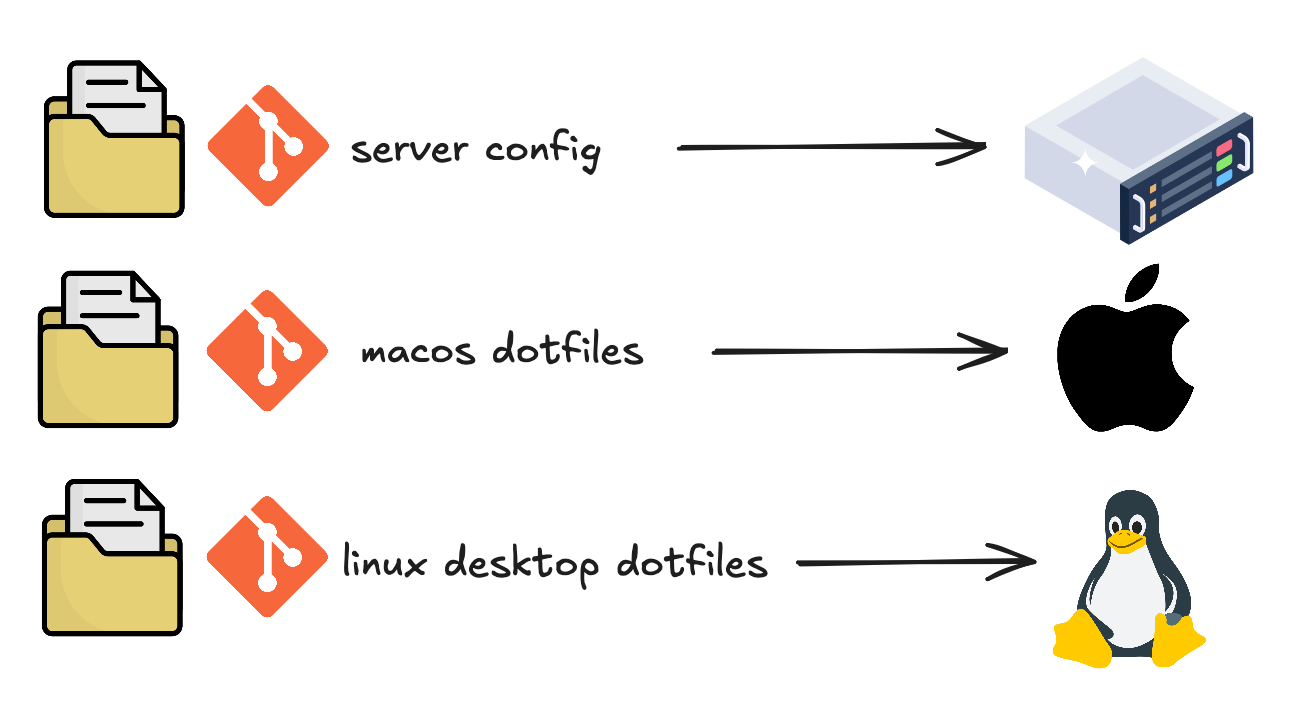
Previously, I stated that we can add multiple machines on our flakes. We can easily share our exact configuration to another machine. What I mean here not only another macbook but we can share our packages configuration to another linux machines, including linux desktop and linux server with one big monorepo here, thanks to nix flakes and home-manager here. With nixfied approach, we can build ultimate dotfiles from this:
MacBook Pro/
├── .zshrc
├── .vimrc
├── .gitconfig
└── brew_packages.txt

iMac/
├── .zshrc
├── .vimrc
├── .gitconfig
└── brew_packages.txt

Linux Server/
├── .bashrc
├── .vimrc
├── .gitconfig
└── apt_packages.txt
to become something like this:
dotfiles/ (Git repo)
├── flake.nix                    # One entry point
├── flake.lock                   # Locked dependencies
├── machines/
│   ├── macbook-pro.nix         # Machine-specific (macOS)
│   ├── imac.nix                # Machine-specific (macOS)
│   └── linux-server.nix        # Machine-specific (NixOS)
├── darwin/
│   └── configuration.nix       # macOS-specific settings
├── nixos/
│   └── configuration.nix       # NixOS-specific settings
└── home/
    ├── common.nix              # Shared across all machine
    ├── terminal.nix            # Shell, vim, git configs
    ├── development.nix
    └── packages.nix
Since I’m still bad at explaining things through writing and LLMs are now able to explain easily as text generating machine, it’s better to explain nix with my excalidraw image
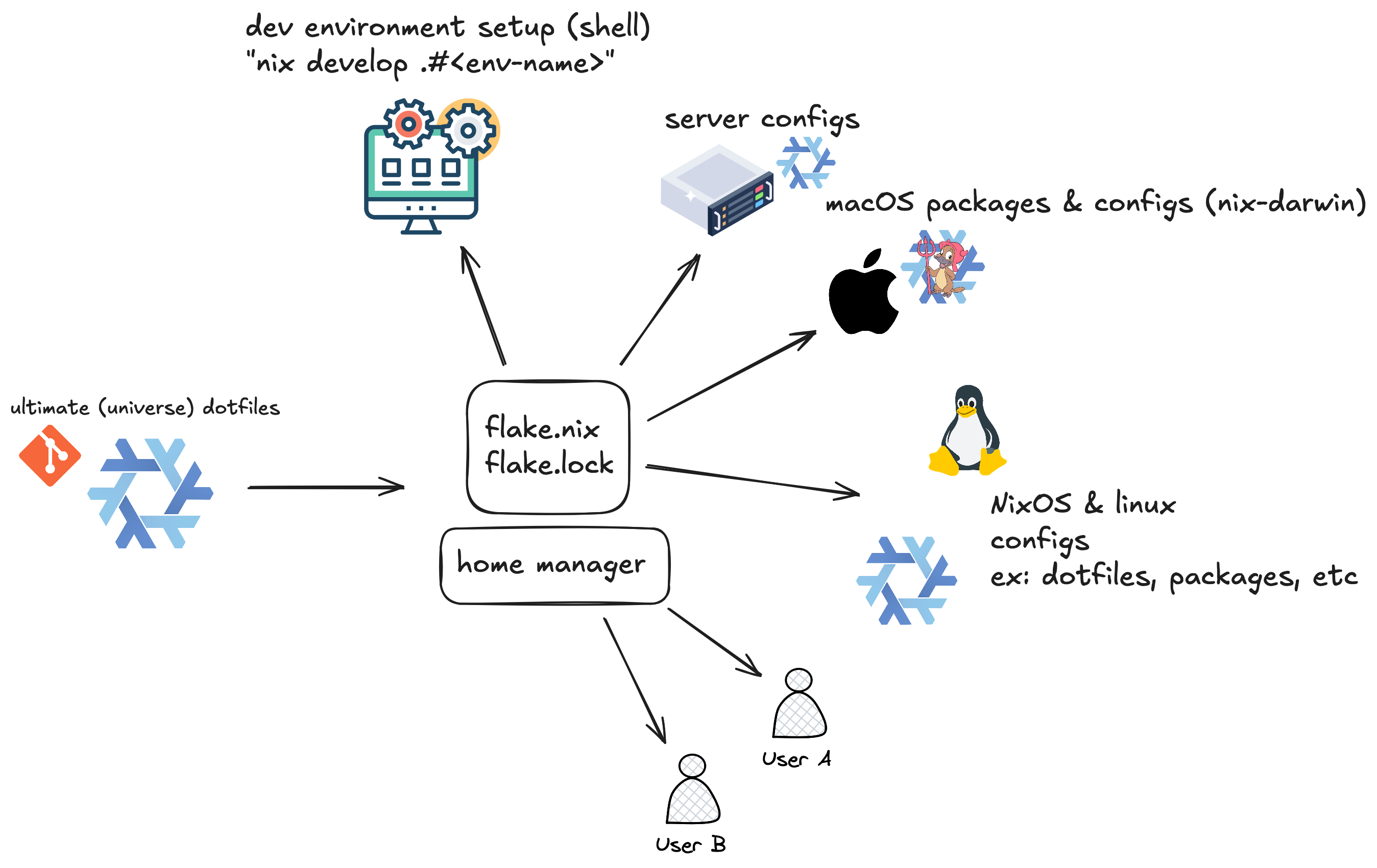
I hope you understand what I’m trying to visualize here and how nix helps here 🚶
Nix-Darwin & Nix Installation Setup on Mac OS
Nix-darwin is nix modules for darwin (apple) system. Thanks to nix-darwin, we are able to configure macOS declaratively using nix. First, we need to install nix first on our system. I was using nix installer from Determinate Systems since it was the recommended one on nix-darwin github repo for flake-based setup. You can see the installation guide in nix-darwin repo itself.
One of the main difference between NixOS and nix-darwin is in the command itself. On NixOS, if we want to switch to our new configuration,
we use nixos-rebuild switch, while on nix-darwin, it’s darwin-rebuild switch. With flakes, it becomes darwin-rebuild switch --flake .#your-hostname.
Tradeoff
Alright, after all these explanations, we might be wondering, does nix fix everything? does nix fix this? Well unironically maybe yes if you are comparing to some of packager managers or deployment stacks. Seems too good to be true? Yes, it is unironically. Then what’s the tradeoff? Well there is many but I will list the tradeoffs based on my personal experiences.
Learning Curve
Quite obvious the first one is learning curve to learn what nix is and what nix does solve??
Also we have to familiar with functional programming paradigm and declarative way of applying configuration and managing your package rather than good ol imperative way to do it.
You need time to learn and understand what nix is, what nix capable of, why is nix exist, why nix fix this, etc.
We might need to take our time and patience to learn especially for 9-5 wageslaves employed people.
As nix itself is not only the “package manager” but its also pure functional language itself. Therefore, it might feels like learning new programming language all over again. The mental model of using nix itself quite different to other package managers, system managing, and languages. We have to adapt and shift to new mental model for using nix, thinking in terms of derivations, the store, and purity too.
There is plenty of people complained that the nix documentation itself quite confusing and bad 2 3 4.
There is multiple tools to learn such as nix-shell, nix-direnv, nix build, etc. There are often multiple ways to do the same thing,
which might adds confusion for newcomers. The example of this was when I was trying to configure my nixified dotfiles, there is multiple patterns
to do it with almost same result. The newest pattern I have found so far was dendritic pattern 5 6, writing nix configurations based on flake-parts.modules.
For the development environments, you can use;
nix-shellwithshell.nixnix developwithflake.nixdevbox(third-party)nix-direnv(leveraging flake.nix/nix develop with direnv)- etc…
There is more, for installation media you can:
- install via ISO and setup manually as usual linux distro installation
- nixos-infect - replacing non-nixos linux host with nixos
- nixos-anywhere - installing nixos via ssh
- clan - actually its p2p computer management framework but you can use it to install and deploy fully-declared customized & battery-included nixos setup to non-nixos linux host via ssh too.
Specifically for dotfiles configuration as I stated before there is multiple ways to do it, like either using home-manager or not it’s up to you. The sheer volume of docs is very high while the information is scattered and sometimes contradictory, and some of them are outdated. Funny that we escape the dependency hell but not documentation hell.
Disk Space
As nix able to stores multiple versions of same package or app in /nix/store, it can consume significant disk space over time if you don’t setup garbage collection on your configuration
or regulary run garbage collection manually. I added this as “tradeoff” since my disk space grew quickly as previously I setup my nix GC for monthly then I did a lot of configuration tweak overtime (almost everyday backthen).
Build Times
This is my personal tradeoff as when packages aren’t cached in the binary cache, we have to build from source. Since my home wifi connection not that fast and sometimes I use my own phone internet data, it takes long time and significant amount of my internet quota especially for large packages.
Collaboration & Community
The nix community is smaller than ecosystem like homebrew or apt means fewer answers and discussion on forums ex: stackoverflow (yes, no one use it anymore), nix discourse, etc. Some packages may be outdated or unmaintained in nixpkgs (this is the realest issue I have encountered so far). Some of packages I have been using on my machine are not maintained anymore. The most annoying issue was when I tried to update to the latest claude code package (nixpkgs unstable channel) because the claude code package still on long process of CI/CD verification of claude code on nixpkgs repo PR itself also we have to verify with the package maintainer too (and passed linux and darwin kernel verification). Because of this, some of packages I use in my current dotfiles configuration are built from the source directly.
Smaller community and ecosystem is not really tradeoff and problem for me personally as long as the software or the tool I use provide enough value for myself aka good enough. The problem might be that, if you are using nix for your own personal project, its really great as you have full control of your own techstack, infra, deployment, etc. But for collaboration? Convincing your team to adopt nix and say “nix fix this” can be difficult given the learning investment and mental model required from everyone.
Integration Friction
As newcomer that using nix as current daily driver now, this one might be become the most annoying thing to trade with repeatedly in practice.
Since most of tools and workflows I have been using assume filesystem hierarchy standard layout (/usr/lib, /usr/bin) while nix completely using
/nix/store/ for tools and workflows path. I got repeatedly hit with path issue when i was using some of tool or software that already assume the filesystem layout either
precompiled binaries one or hardcoded path one.
You will keep encountering this issue when you are using ai agent tools such as codex and claude code. The example case is when an agent
try to invoke python or bun tool calling, it will return as error as the path of python and bun are located in /nix/store/<unique-hash> while
an agent assumes that these tools are located in usual /usr/ path. For this one, we can tackle the issue through creating a persistent profile or declare the package path correctly for these ai agents
then (or) use direnv + nix-direnv.
Leveraging LLM for Nix Configuration
As the time we need to learn nix (gracefully) both the languages and how it works, not even time for write code for all the configuration we want to rewrite such as dotfiles, server, deployment tool, etc.
Do we actually have the time for that? Are we unemployed enough to do all of that alone?
As I’m writing this, I’m still actively learning nix myself and every week I get new knowledge (or some kind of enlightment) about nix.
The latest one was leveraging nix-direnv for project dependency dev environment.
Fortunately, we can whip AI agent to work for us. Most of my dotfiles configuration code is written by AI especially the boilerplate code. Surprisingly, LLMs are good enough for writing nix code as there is a lot of nix codebase repository available in internet so I assume there is enough nix code in LLM training data. You can leverage LLM output more by context engineering, tool calling, MCP, and whatever it is.
Using NixOS MCP & Search Tool
The first obvious thing we can do to leverage LLM output regarding to nix codebase is using nix-related MCP or web-search tool to let the LLM search nix-related stuff in the search engine. In the context of search tool, most of ai agent tools already included web-search tool feature.
For MCP, what I have been using is MCP-NixOS by utensils. This MCP server give our LLM response real-time information about nixos packages (nixpkgs), configuration options, home-manager settings, nix-darwin configurations, and package version history via nixhub to increase our LLM response accuracy on nix stuffs. I often use this MCP for:
- search and browse nixpkgs (
nixos_search()andnixos_info()) - search and browse home-manager options (
home_manager_search(), home_manager_info()) - search and browse darwin/macOS related (
darwin_search(),darwin_info())
Mostly for browsing nixpkgs and home-manager related so I want to make sure the LLM response is grounded or accurate enough, not hallucinating. MCP often ends up bloating our LLM context window, or as we can call it “context rot”, I avoid MCP at all cost if possible I don’t use MCP all the time when I was working on nix stuffs. We can just straight dump the context as prompt to LLM if we are already familiar enough with nix later on.
AGENT.md as Context & Instructions
We can use AGENT.md or CLAUDE.md to leverage LLM output when you are working with nix codebase repository. I believe CLAUDE.md is the biggest leverage you can use
as you can define what, why, and how on your project repository 7. Tell claude or whatever you are using how it should work on the project. For nix example, we can tell it to
use nix fmt and nix flake check after finished nix code implementation to validate all the hosts (and flake) you are working with.
You may tell claude for host-specific validation such as tell it to use darwin-rebuild switch --flake --dry-run .#your-macbook for final testing before you decide to switch to your
current nix configuration on your macbook.
On the “what” part, tell claude about the tech you are using and its project structure. This is really important if you are working on nix project since there could be multiple architectural
patterns you can use to achieve same result. Tell claude what is your nix codebase tree and repository looks like in high level, what flake.nix used for and included there and what module/
path is. AGENT.md and CLAUDE.md are the highest leverage point of the harness 7, so craft the context carefully, dump our “nix-way” to claude for best results.
Reminder that as less (instruction) is more 7, don’t tell claude all unnecessary information, to avoid bloating our context window for instruction count. For linter and code formatting, use
nix fmt (and nix flake check --all-systems) as pre-commit hook.
Sub-Agent & Skill
I haven’t try this yet but the idea is you can leverage claude code and opencode subagent feature for nix-related, you can call it as nix-coder.
Everytime an agent have to working with nix repository, we can invoke this nix-coder subagent to tackle the code and pass the relevant context to the
main agent thus more effective context usage later on while an agent might generate better code too.
My Dotfiles Configuration
My current dotfiles tree to manage my macOS packages and system:
├── AGENTS.md
├── CLAUDE.md -> AGENTS.md
├── README.MD
├── flake.lock
├── flake.nix
├── hosts
│   ├── desktop.nix
│   └── dev-vm.nix
├── modules
│   ├── darwin
│   │   ├── devtools.nix
│   │   ├── home
│   │   │   ├── default.nix
│   │   │   └── programs
│   │   │       ├── aerospace
│   │   │       │   ├── default.nix
│   │   │       │   ├── modes.nix
│   │   │       │   ├── user-settings.nix
│   │   │       │   └── workspaces.nix
│   │   │       └── ghostty.nix
│   │   ├── homebrew.nix
│   │   └── system.nix
│   ├── home
│   │   ├── base.nix
│   │   ├── devtools
│   │   │   ├── ai-tools.nix
│   │   │   ├── default.nix
│   │   │   ├── direnv.nix
│   │   │   ├── languages.nix
│   │   │   └── try.nix
│   │   ├── programs
│   │   │   ├── fastfetch
│   │   │   │   ├── default.nix
│   │   │   │   └── oguri-logo.txt
│   │   │   ├── helix.nix
│   │   │   ├── neovim.nix
│   │   │   └── nvim
│   │   │       ├── init.lua
│   │   │       ├── lazy-lock.json
│   │   │       └── lua
│   │   │           ├── config
│   │   │           │   ├── autocmds.lua
│   │   │           │   ├── keymaps.lua
│   │   │           │   ├── lazy.lua
│   │   │           │   ├── lazyvim
│   │   │           │   │   └── init.lua
│   │   │           │   └── options.lua
│   │   │           └── plugins
│   │   │               ├── auto-save.lua
│   │   │               ├── coding.lua
│   │   │               ├── colorscheme.lua
│   │   │               ├── completion.lua
│   │   │               ├── dashboard.lua
│   │   │               ├── file-explorer.lua
│   │   │               ├── formatting.lua
│   │   │               ├── linting.lua
│   │   │               ├── lsp.lua
│   │   │               ├── smear_cursor.lua
│   │   │               ├── treesitter.lua
│   │   │               ├── ui.lua
│   │   │               └── which-key.lua
│   │   ├── secrets.nix
│   │   └── shell
│   │       ├── fish.nix
│   │       ├── nushell.nix
│   │       ├── starship
│   │       │   ├── default.nix
│   │       │   ├── starship.toml
│   │       │   └── starship.toml.bak
│   │       └── tmux.nix
│   └── nixos
│       ├── audio.nix
│       ├── bluetooth.nix
│       ├── containerization.nix
│       ├── desktops
│       │   ├── README.md
│       │   ├── apps
│       │   │   ├── browsers.nix
│       │   │   └── terminals.nix
│       │   ├── base.nix
│       │   ├── gaming.nix
│       │   ├── hardware-configuration.nix
│       │   ├── hyprland
│       │   │   └── default.nix
│       │   ├── plasma.nix
│       │   └── themes
│       │       ├── catppuccin.nix
│       │       └── default.nix
│       ├── fonts.nix
│       ├── graphics.nix
│       ├── home
│       │   └── default.nix
│       ├── network.nix
│       ├── ssh.nix
│       ├── system.nix
│       ├── users.nix
│       └── virtualization.nix
├── packages
│   ├── default.nix
│   ├── opencode.nix
│   ├── osgrep-package-lock.json
│   └── osgrep.nix
├── secrets
│   ├── README.md
│   └── local-ai-tokens.sops.yaml
└── shells
    ├── README.md
    ├── ai-agent.nix
    ├── ai-notebook.nix
    ├── default.nix
    ├── effect-ts.nix
    ├── go.nix
    ├── jupyter-notebook.nix
    ├── python-uv.nix
    ├── rust.nix
    └── web-bun.nix
Because I tend to switch between codex and claude code, I symlinked AGENT.md to CLAUDE.md so if I changed my AGENT.md, my CLAUDE.md will be changed too, also it has exactly same prompt and context as it is symlinked.
For the module/ path, I decided to modularize it between macOs system-specific (darwin), home-manager specific, and nixos machine (linux).
It might looks confusing and weird why is there home-manager specific which user-level isolation while other modules are kernel-level isolation.
I decided to put home-manager modules beside darwin and nixos module so I can tweak my personal configured packages and tools like neovim, helix,
and nushell can be easily managed for myself (the who use and maintain the repo is me anyway). I put lazyvim and lua-layers for neovim configuration directly
on my dotfiles repo to easily configure my neovim directly there, but as I said there is plenty ways to manage your neovim configuration on nix. One of the most
popular way is through NixVim. My current neovim configuration way is just declared neovim via nixpkgs then initialized
lazyvim then streamlined and disabled unnecessary plugin (mason) and adding my personal favorite neovim (ex: smear cursor).
My current daily driver shell is nushell with prompt configuration via starship, one of the popular prompts also the most flexible to use within other shells so far beside oh-my-posh with tmux as multiplexier and running multiple terminal sessions (really great for whipping your agents remotely!)
On the devtools/ path, I added bunch of personalized devtools such as ai agent tools (claude code, codex, etc.), direnv, programming languages (uv/python, golang, rust),
and try. Recently, I added try as I found the tool itself aligns with what I need. I often test several temporary projects especially
related to my current job which is data scraping & crawling then my project files are scattered randomly everywhere. Think that try able to solve my current issue and I feel
satisfied too. I will recommend it to anyone that struggling with doing bunch of temporary testing repos!
As I declared and added some GLM wrapper inside claude code defined too 8, I wrote every ai tools that I usually use under one file but as I’m writing this, I found that
there is better option to do it. I found llm.agents.nix made by numtide. Turns out it already included bunch of ai tools I declared
so I might replace my entire ai-tools configuration with the llm.agents.nix one soon.
For macOS aka darwin modules, mostly its software and tilting window manager tweaks. I’m still using homebrew on my nix system despite I stated that I replaced homebrew earlier. But it feels better that we can manage brew packages in declarative way and more manageable then via the old way.
  options.rsydn.homebrew = {
    enable = mkOption {
      type = types.bool;
      default = true;
      description = "Whether to manage Homebrew declaratively.";
    };
    taps = mkOption {
      type = types.listOf types.str;
      default = [ "FelixKratz/formulae" ];
      description = "Homebrew taps to add.";
    };
    brews = mkOption {
      type = types.listOf types.str;
      default = [ "curl" "yt-dlp" "ruff" "libmagic" "infisical" "imagemagick" ];
      description = "Homebrew formulae to install.";
    };
    casks = mkOption {
      type = types.listOf types.str;
      default = [
        "bitwarden"
        "brave-browser"
        "firefox"
        "pgadmin4"
        "spotify"
        "vesktop"
        "obs"
        "neohtop"
        "orbstack"
        "ghostty"
        "openvpn-connect"
      ];
      description = "Homebrew casks to install.";
    };
  };
You can switch the state of your brew packages in your system via boolean value also declare directly on the code for brew cask
rather than install on terminal. This is really great as if you want to install bunch of brew casks on fresh apple/darwin machine,
all of them will be installed through classic darwin-rebuild switch --flake .#your-macbook command. No need to reinstall via brew cask install <insert here>
and no need to remember all the brew casks again! Oh one more thing..
  config = mkIf cfg.enable {
    homebrew = {
      enable = true;
      global.autoUpdate = false;
      onActivation = {
        autoUpdate = false;
        cleanup = "zap";
        upgrade = false;
      };
      inherit (cfg) taps brews casks;
    };
  };
You can also declare whether you want to set autoupdate and upgrade behaviour of brew itself in the code. Oh
also on cleanup = "zap", everytime we switched to our updated flakes, all brew packages that not declared in our
homebrew.nix will be gone thus it called “zap” (maybe).
Tilting window manager that I used on my macOS is aerospace. I use hyprland as tiling window manager on my desktop so I think I need one too for my daily workflow to simulate similar keymap and workflow on my desktop. You can configure user settings, modes, and workspace-binding as in my dotfiles declaratively on aerospace. Check this one for references (or maybe my dotfiles).
The second thing I customized a lot in my darwin modules is ghostty, gpu-accelerated terminal that currently trending amongst the developers, made by Mitchell Hashimoto himself, who is nix user too 9.
{ config, ... }: {
  programs.ghostty = {
    enable = true;
    package = null;

    settings = {
      theme = "gruvbox";
      background-opacity = 0.9;
      shell-integration = "detect";
      working-directory = "home";
      window-inherit-working-directory = true;
      keybind = [
        "super+a>n=new_window"
        # Split bindings - using v and s instead of | and - for better reliability
        "super+a>v=new_split:right"
        "super+a>s=new_split:down"
        # Navigation
        "super+a>h=goto_split:left"
        "super+a>j=goto_split:down"
        "super+a>k=goto_split:up"
        "super+a>l=goto_split:right"
        # Other actions
        "super+a>z=toggle_split_zoom"
        "super+a>x=close_surface"
        "super+a>r=reload_config"
      ];
    };

    themes.gruvbox = {
      background = "282828";
      foreground = "ebdbb2";
      cursor-color = "ebdbb2";
      cursor-text = "282828";
      selection-background = "ebdbb2";
      selection-foreground = "282828";
      palette = [
        "0=#282828"
        "1=#cc241d"
        "2=#98971a"
        "3=#d79921"
        "4=#458588"
        "5=#b16286"
        "6=#689d6a"
        "7=#a89984"
        "8=#928374"
        "9=#fb4934"
        "10=#b8bb26"
        "11=#fabd2f"
        "12=#83a598"
        "13=#d3869b"
        "14=#8ec07c"
        "15=#ebdbb2"
      ];
    };
  };
}
I declaratively configured the gruvbox theme, customized keybinding, and background tweaking (opacity level) on there. You can customized further as much as you want as long as ghostty support the customization itself.
My current nixfied dotfiles here (might be refactored in the future..)
TLDR
Nix is a purely functional package manager that stores packages in isolation (/nix/store) with unique hashes, enabling rollbacks, no dependency hell, and atomic upgrades. With nix flakes + nix-darwin + home-manager, you can declaratively manage your entire macOS system (packages, shell, window manager, etc.) from a single git repo that works across multiple machines.
Come with tradeoffs; steep learning curve, scattered docs, disk space (only if you skip or forget to setup garbage collection), and path friction with tools expecting /usr/bin. Well most of these tradeoffs could be easily tackled though. Current SOTA LLMs are surprisingly good enough at writing nix code with MCP tools and AGENT.md (+context engineering) to boost accuracy and code quality.
References & Resources
Since this is actually more like my personal learning experiences dumping that somehow sounds little educational and there is nix introduction too. But since I’m still learning and adapting to nix myself, I will provide lists of nix-related resources that I found really helpful and useful for me personally that I hope it will be helpful to whoever reading this. So, at the end, I hope that the word “Nix” will sound less intimidating than writing python.
This section will be updated in the future if I found useful and good resource related to nix.
- Vimjoyer, best nix youtuber fr
- NixOS: Everything Everywhere All At Once
- NixOS Search
- Official NixOS Wiki
- Awesome Nix
- Zero to Nix, by DeterminateSystems
- NixOS & Flakes Book, An unofficial book for beginners